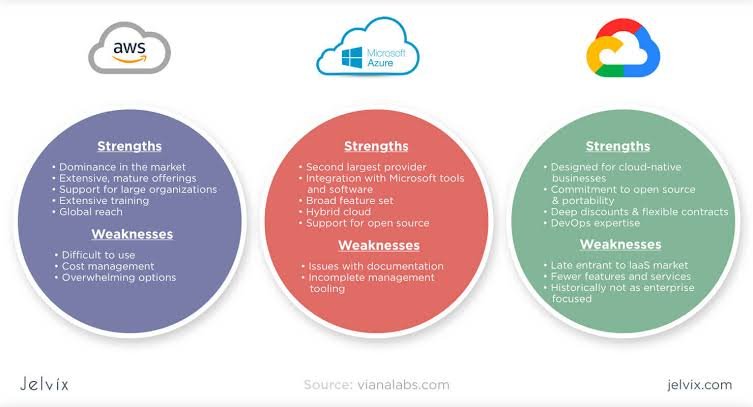
Cloud computing has become an essential part of modern business. Companies use cloud platforms to host websites, store data, run applications, manage databases, and build artificial intelligence solutions without having to maintain all their computing infrastructure themselves.
Among the biggest names in the industry are Amazon Web Services (AWS), Microsoft Azure, and Google Cloud. All three offer powerful cloud services, global infrastructure, and tools for businesses of different sizes. However, each platform has its own strengths, pricing structure, and areas of specialization.
For beginners, startups, developers, and large enterprises, choosing the right provider can be challenging. One platform might offer the services you need at an attractive price, while another may integrate better with your existing software or provide more suitable tools for AI development.
So, AWS vs. Microsoft Azure vs. Google Cloud: which is best?
The answer depends on your business goals, technical requirements, budget, and the applications you plan to run. Let’s compare these three cloud platforms to understand what each one offers and which might be the right choice for you.
1. What Are AWS, Microsoft Azure, and Google Cloud?
Before comparing their features, it helps to understand what each platform does.
Amazon Web Services (AWS)
Amazon Web Services, commonly known as AWS, is Amazon’s cloud computing platform. It offers a broad range of services, including computing, storage, databases, networking, analytics, security, and machine learning.
AWS is widely used by startups, software developers, online businesses, and large enterprises. Its extensive service catalog makes it suitable for everything from hosting a small website to operating complex global applications.
Popular AWS services include:
- Amazon EC2: Virtual servers for running applications.
- Amazon S3: Object storage for files, backups, and application data.
- Amazon RDS: Managed relational databases.
- AWS Lambda: Serverless computing for running code without managing servers.
- Amazon Bedrock: Services for building generative AI applications using supported foundation models.
AWS is particularly attractive to organizations that want extensive infrastructure options and flexibility when designing cloud environments.
Microsoft Azure
Microsoft Azure is Microsoft’s cloud computing platform. It provides infrastructure, databases, networking, analytics, AI tools, and application development services.
Azure is especially attractive to organizations that already use Microsoft products such as Windows Server, Microsoft 365, SQL Server, and Microsoft Entra ID.
Popular Azure services include:
- Azure Virtual Machines: Virtual servers for applications and workloads.
- Azure Blob Storage: Object storage for unstructured data.
- Azure SQL Database: Managed relational database services.
- Azure Functions: Serverless computing for event-driven applications.
- Azure AI Foundry: Tools and services for developing and managing AI applications.
Azure is a strong option for businesses that want to connect cloud services with existing Microsoft infrastructure or maintain a combination of on-premises and cloud systems.
Google Cloud
Google Cloud is Google’s cloud computing platform. It offers computing, storage, networking, databases, analytics, machine learning, and AI development tools.
The platform benefits from Google’s experience in data processing, large-scale infrastructure, and AI research. It is particularly attractive to data-driven organizations and developers building analytics or AI-powered applications.
Popular Google Cloud services include:
- Compute Engine: Virtual machines for running workloads.
- Cloud Storage: Object storage for files and application data.
- Cloud SQL: Managed relational databases.
- Google Kubernetes Engine (GKE): Managed Kubernetes for containerized applications.
- Vertex AI: Tools for developing, deploying, and managing machine learning and AI applications.
Google Cloud is worth considering for organizations that prioritize data analytics, Kubernetes, modern application development, and AI workloads.
2. AWS vs. Azure vs. Google Cloud: Quick Comparison
| Feature | AWS | Microsoft Azure | Google Cloud |
|---|---|---|---|
| Best known for | Broad cloud service selection | Microsoft integration | Data analytics and AI |
| Computing | Amazon EC2 | Azure Virtual Machines | Compute Engine |
| Object storage | Amazon S3 | Azure Blob Storage | Cloud Storage |
| Serverless | AWS Lambda | Azure Functions | Cloud Run functions |
| Kubernetes | Amazon EKS | Azure Kubernetes Service | Google Kubernetes Engine |
| AI development | Amazon Bedrock and SageMaker AI | Azure AI Foundry | Vertex AI |
| Enterprise integration | Extensive infrastructure options | Strong Microsoft ecosystem | Strong data and analytics capabilities |
| Hybrid cloud | AWS hybrid services | Azure Arc and hybrid services | Google Distributed Cloud |
| Pricing | Usage-based, with multiple pricing options | Usage-based, with enterprise agreements and discounts | Usage-based, with sustained-use and other discounts |
| Learning curve | Broad service catalog can be challenging | Familiar to Microsoft administrators | Attractive to data and cloud-native developers |
All three platforms provide enterprise-grade cloud services. The differences become clearer when you compare specific workloads, integrations, pricing requirements, and the skills available within your team.
3. Performance and Reliability
Performance is an important consideration when choosing a cloud provider. Applications need sufficient computing power, reliable storage, and low network latency to deliver a good user experience.
AWS, Azure, and Google Cloud all operate global cloud infrastructure and offer services designed for high availability.
AWS Performance
AWS provides a wide selection of virtual machine types, storage options, networking services, and specialized computing resources.
This variety allows businesses to choose infrastructure for different workloads, including web applications, databases, large-scale analytics, and high-performance computing.
AWS also provides multiple availability zones in supported regions, allowing customers to design systems that remain operational if certain infrastructure components fail.
However, reliability depends on how the application is configured. Simply deploying an application to AWS does not automatically protect it from every outage.
Microsoft Azure Performance
Azure offers a broad range of computing options, including general-purpose virtual machines, GPU-powered instances, managed databases, and enterprise networking services.
Its integration with Microsoft technologies can make it particularly useful for organizations running Windows-based applications or connecting cloud resources with existing corporate systems.
Azure also supports availability zones and other resilience features in supported regions.
For businesses already using Microsoft infrastructure, Azure can reduce integration work and simplify certain administrative tasks.
Google Cloud Performance
Google Cloud offers scalable computing resources and infrastructure designed to support demanding applications, data processing, and AI workloads.
Its networking capabilities and managed data services are particularly relevant for organizations handling large datasets or operating distributed applications.
Google Kubernetes Engine is also a major attraction for teams deploying containerized software.
As with the other providers, actual performance depends on the selected region, hardware configuration, application design, and network conditions.
Which platform performs best?
There is no universal winner. The best choice depends on the workload, the location of your users, and the resources your application requires. Businesses should test their own applications before making a long-term commitment.
4. Pricing: Which Cloud Platform Is More Affordable?
Cloud pricing is one of the most important factors to consider, especially for startups and growing businesses.
All three providers offer pay-as-you-go services, but the final bill depends on computing usage, storage, network traffic, software licensing, support, and other factors.
AWS Pricing
AWS offers several ways to pay for infrastructure, including on-demand pricing, savings plans, and reserved capacity options for eligible services.
Its flexibility allows customers to optimize spending for different workloads. However, the number of available services and pricing options can make cost estimation complicated for beginners.
Data transfer charges and underused resources can also increase monthly expenses if they are not monitored carefully.
Azure Pricing
Azure provides usage-based pricing, reservation options, and eligible savings plans. Organizations with existing Microsoft licensing agreements may also qualify for certain cost benefits through programs such as Azure Hybrid Benefit.
These advantages can make Azure attractive to businesses migrating existing Windows Server or SQL Server workloads.
However, eligibility requirements vary, and customers should calculate their actual costs rather than assuming that Microsoft integration automatically makes Azure cheaper.
Google Cloud Pricing
Google Cloud offers usage-based pricing and several discount mechanisms, including sustained-use discounts for eligible resources and committed-use discounts for qualifying workloads.
Its pricing tools can help customers estimate expenses and identify potential savings.
Google Cloud may be cost-effective for particular computing, analytics, and data-processing workloads, but the outcome depends on the services selected and the usage pattern.
How to Choose the Most Affordable Option
Before selecting a provider, estimate the total cost of running your application, including:
- Virtual machines, CPUs, GPUs, and memory.
- Storage capacity and database usage.
- Internet traffic and data transfer between regions.
- Backup, monitoring, and security services.
- Software licenses and technical support.
- Costs associated with scaling and downtime.
For a small website, the differences may be relatively modest. For an AI application processing millions of requests, the choice of infrastructure can have a much greater financial impact.
The cheapest cloud provider on paper is not necessarily the cheapest option for your specific workload.
5. Artificial Intelligence and Machine Learning
AI has become a major area of competition among cloud providers. Businesses increasingly rely on cloud infrastructure to train models, run inference workloads, analyze data, and build AI-powered applications.
AWS for AI
AWS offers Amazon Bedrock for building generative AI applications and Amazon SageMaker AI for developing, training, and deploying machine learning models.
Its infrastructure includes computing options designed for demanding AI workloads, including GPU-based instances and specialized accelerators.
AWS can be a strong choice for businesses that want to build AI applications alongside existing cloud infrastructure, databases, and application services.
Azure for AI
Microsoft Azure offers AI development tools through Azure AI Foundry and related services.
Its close relationship with Microsoft’s software ecosystem makes it attractive to enterprises integrating AI into business applications, productivity tools, and existing data environments.
Organizations already using Microsoft technologies may find it convenient to manage AI applications alongside their broader cloud infrastructure.
Google Cloud for AI
Google Cloud provides AI development and deployment capabilities through Vertex AI, as well as access to Google’s AI models and specialized computing infrastructure.
Its experience in machine learning, data analytics, and large-scale computing makes it a compelling option for organizations developing sophisticated AI applications.
Google Cloud is especially worth considering when AI workloads depend heavily on data processing, model development, and integration with analytical services.
Which cloud is best for AI?
The answer depends on the AI model, available hardware, data requirements, pricing, and integration needs.
- Choose AWS if you want extensive infrastructure options and a broad selection of AI services.
- Consider Azure if your AI projects need to integrate closely with Microsoft’s enterprise software.
- Consider Google Cloud if your workloads emphasize data analytics, machine learning, and Google’s AI ecosystem.
Before committing, benchmark the specific models and services you intend to use.
6. Security and Compliance
Security is essential for any organization moving data and applications to the cloud.
AWS, Azure, and Google Cloud offer tools for identity management, encryption, access control, logging, threat detection, and regulatory compliance.
However, cloud security follows a shared-responsibility model. Providers secure their underlying infrastructure, while customers remain responsible for many aspects of their applications, identities, permissions, and data protection.
AWS Security
AWS provides services for identity and access management, encryption, security monitoring, and threat detection.
Organizations can configure detailed access policies and use monitoring tools to identify suspicious activity.
The main challenge is ensuring that the many available security features are configured correctly and maintained consistently.
Azure Security
Azure offers identity and access controls, security monitoring, policy management, and integration with Microsoft’s broader security products.
For companies already using Microsoft Entra ID and related enterprise security tools, this integration can simplify parts of identity management and security administration.
Google Cloud Security
Google Cloud provides identity management, encryption, security monitoring, and tools for managing organizational policies.
Its security services can help businesses protect cloud workloads and monitor risks across their infrastructure.
As with AWS and Azure, organizations must configure services properly and follow appropriate security practices.
Which is best for security?
All three platforms provide sophisticated security capabilities. The better choice depends on your compliance requirements, existing security tools, internal expertise, and ability to configure and monitor the environment correctly.
No cloud provider can eliminate the need for responsible security management.
7. Ease of Use and Learning Curve
The best cloud platform is not always the one with the largest number of features. It is also the one your team can understand, operate, and maintain effectively.
AWS
AWS has a very broad service catalog, which is useful for experienced cloud architects but can feel overwhelming to beginners.
Its documentation, training materials, and certification programs make it possible to develop skills progressively.
AWS is particularly suitable for people interested in cloud engineering, infrastructure architecture, and DevOps.
Azure
Azure may be easier for IT professionals already familiar with Windows Server, Active Directory concepts, Microsoft 365, or other Microsoft enterprise products.
Its integration with familiar technologies can reduce the learning curve for some business environments.
It is a practical option for organizations modernizing existing Microsoft-based systems.
Google Cloud
Google Cloud offers tools that appeal to developers, data engineers, and teams working with containers and modern application architectures.
Its Kubernetes services and analytics platform are particularly useful for cloud-native and data-intensive projects.
For beginners, the most suitable platform often depends on their existing skills and career goals.
8. Hybrid Cloud and Multi-Cloud Capabilities
Many organizations cannot move every application to a single public cloud. They may need to maintain on-premises systems, meet regulatory requirements, or distribute workloads across different environments.
All three providers offer solutions for these situations.
- AWS: Offers hybrid infrastructure services, including AWS Outposts, for supported workloads that need to run closer to existing facilities.
- Microsoft Azure: Provides Azure Arc to help manage certain resources across on-premises, edge, and other cloud environments.
- Google Cloud: Offers Google Distributed Cloud solutions for supported workloads that require infrastructure outside conventional public cloud regions.
Azure can be particularly attractive for businesses with substantial Microsoft-based infrastructure. AWS and Google Cloud also offer options for organizations that need hybrid deployments or more control over where workloads run.
Multi-cloud environments can provide flexibility, but they also introduce complexity. Businesses must manage different identity systems, monitoring tools, billing models, and deployment processes.
It is usually better to adopt a multi-cloud strategy for a clear business reason rather than using multiple providers simply because the option exists.
9. Which Cloud Platform Is Best for Startups?
Startups often need a cloud platform that can scale as their customer base grows without requiring a large upfront investment.
AWS is a strong choice for startups that want a broad range of infrastructure services and flexibility as their applications become more complex.
Azure can be attractive to startups building products around Microsoft technologies or selling software to enterprise customers that already use the Microsoft ecosystem.
Google Cloud is worth considering for startups focused on AI, analytics, containerized applications, and data-intensive products.
For a new business, the most important considerations are usually:
- How much the application will cost to run.
- Whether the required services are available.
- How quickly the development team can build and deploy.
- Whether the platform supports future growth.
- How easy it will be to monitor costs and maintain security.
Startups should also investigate free-tier eligibility, startup programs, and cloud credits, since these can reduce early infrastructure costs.
However, promotional credits eventually expire. It is important to understand the regular pricing before building a business around a particular service.
10. Which Cloud Platform Is Best for Large Enterprises?
Large enterprises often have more complicated requirements than startups. They may need to support thousands of employees, integrate with legacy systems, meet regulatory requirements, and operate applications across multiple countries.
AWS is suitable for organizations that require a wide range of cloud infrastructure services and flexible architectures.
Azure is often a natural candidate for businesses already invested in Microsoft’s enterprise software and identity systems.
Google Cloud can be particularly compelling for organizations that prioritize large-scale analytics, machine learning, and data-driven applications.
For enterprises, the decision should also consider technical support, governance, migration costs, disaster recovery, and the availability of people with the required skills.
A cloud migration can affect the entire organization, so it is worth testing the proposed architecture and calculating long-term costs before committing to a large deployment.
11. AWS vs. Azure vs. Google Cloud: Final Verdict
There is no single cloud platform that is best for every organization. Each provider has developed a broad ecosystem of services, and all three can support demanding production workloads.
AWS is the best starting point for many organizations seeking broad cloud infrastructure choices. Its extensive service catalog makes it suitable for a wide variety of applications, from small websites to complex enterprise systems.
Microsoft Azure is a strong choice for organizations already using Microsoft technologies. Its integration with enterprise identity, productivity, and Windows-based infrastructure can make cloud adoption more straightforward.
Google Cloud is a strong option for data analytics, Kubernetes, and AI-focused workloads. Its data and machine learning capabilities make it attractive to teams building modern, data-driven applications.
The best choice ultimately comes down to the services you need, the skills of your team, the location of your users, and the total cost of running your applications.
Before making a final decision, test your actual workload on the platforms you are considering. Compare performance, estimate monthly expenses, review security requirements, and check how easily the solution can scale.
Conclusion
AWS, Microsoft Azure, and Google Cloud are three of the leading cloud computing platforms, but they serve different needs particularly well.
AWS stands out for its extensive infrastructure options and service variety. Azure offers strong integration with Microsoft’s enterprise ecosystem. Google Cloud is particularly appealing for analytics, Kubernetes, and AI development.
For beginners, AWS is a useful starting point for learning general cloud infrastructure, while Azure may be more approachable for people with Microsoft IT experience. Google Cloud is an excellent option for those interested in data engineering and machine learning.
For businesses, the decision should be based on actual requirements rather than popularity alone.
Cloud computing continues to evolve, especially as AI workloads, automation, and data-intensive applications grow. Choosing the right provider today can help an organization build a reliable foundation for future innovation.
The smartest approach is to compare the services you need, understand the long-term costs, and select the platform that best supports your goals.